
Services and Estimates
Separate Service Log and Estimates, with client, location, description and status: Completed, In progress, Pending or custom.
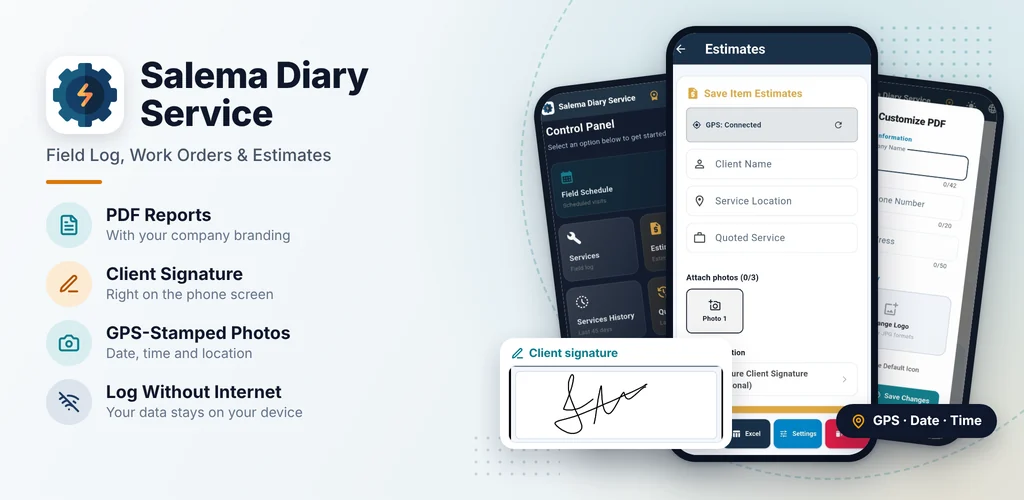
Log jobs and estimates on-site, with stamped photos and the client signing right on the screen. Generate branded PDF and Excel reports, ready to send.
Available for Android. Your data stays only on your device.
Professionals and small businesses that need to record, document and present their work.
From logging on-site to the report in your client's hands.
Separate Service Log and Estimates, with client, location, description and status: Completed, In progress, Pending or custom.
3 photos per record, each with its own date, time and coordinates from the moment it was taken.
In basements and enclosed areas, take photos with your phone's camera and attach them from the gallery once you have signal. They are marked as "Attached from gallery".
Your client signs right on the phone, and the signature is added to the report automatically.
Your company logo, name, phone and address. Daily report or individual work order, sent instantly via WhatsApp or email.
Date, time, source and coordinates for each photo, with an "Open map" link to Google Maps.
Plan your upcoming visits and start a job already filled in from the schedule.
Notes with dictation and quick formatting: bold, italic, lists, time and divider.
Your PDFs and spreadsheets are kept so you can resend them anytime.
A full copy of records, photos, signatures and settings, saved wherever you choose, such as Downloads or Google Drive.
No account required, and your records are not sent to external servers.
Bilingual app with light and dark themes.
Enter the client, location, service and status.
Attach 3 photos: each one gets its own stamp.
Your client signs on the phone screen, right on-site.
A branded PDF or an Excel spreadsheet, sent via WhatsApp or email.
Swipe sideways to see more screens.


Hand your client a branded document with stamped photos, location and their own signature, right after the job.
Service Report
You do not need to sign up or log in.
You decide where to keep your backup.
See exactly what is processed in the Privacy Policy.
Subscription through Google Play, with automatic renewal. Cancel anytime.
Check plans and the free trial offer on Google Play. The subscription renews automatically and can be cancelled anytime in Google Play › Payments & subscriptions.
Yes, for logging jobs, photos and the client signature. These need internet: subscribing, sending reports and, on many devices, voice dictation.
Take the photos with your phone's camera and attach them from the gallery once you have signal. They are marked in the report as "Attached from gallery".
On your device. No account is required, and your records, photos and signatures are not sent to external servers.
For 45 days. The app warns you before the automatic deletion so you can make a backup if you want to keep them longer.
Yes. In "Customize PDF" you set the logo, name, phone and address shown on your reports.
On the Control Panel, under backup, tap "Create Backup" and save it wherever you like. On the new phone, install the app and use "Restore".
For now, Salema Diary Service is available for Android only.
On Google Play: tap your profile picture › Payments & subscriptions › Subscriptions › Salema Diary Service › Cancel.
Instructions are in the "Data Retention and Deletion" section of the Privacy Policy.
Download Salema Diary Service and log your next job with photos, GPS and the client signature.
Get it on Google Play